
FAQs
General
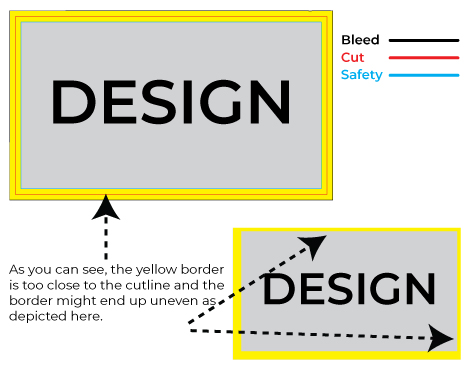
While we generally discourage the use of borders in designs, if you insist on including them, it's important to be aware of a potential issue. If the border is positioned close to the cutline, there is a chance that it might appear slightly off-center when trimmed. To mitigate this risk, we suggest making your borders at least 1/4" thick. This extra width will provide us with ample room for cutting, ensuring a more accurate alignment with the intended design.
Offset printing is a widely used printing technique that involves transferring ink from a plate to a rubber blanket, and then onto the printing surface. Here's how it works:
- Prepress: First, a digital or physical copy of the image or text is created, which is then transferred onto a plate made of aluminum, which is coated with a photosensitive emulsion.
- Plate Making: The plate is exposed to light, which hardens the emulsion in the areas where the image or text is present. The plate is then developed, which removes the unexposed emulsion, leaving behind a raised image or text on the plate.
- Ink Application: The plate is mounted onto the printing press, and ink is applied to it. The ink adheres to the raised image areas on the plate, but not to the non-image areas, which are kept wet by a water or dampening system.
- Printing: The plate comes in contact with a rubber blanket, which is then pressed against the paper or other substrate, transferring the ink onto the surface.
- Finishing: After printing, the ink is allowed to dry, and any necessary finishing such as cutting, binding, or folding is performed.
Offset printing works by using the principle that oil-based ink and water-based dampening system do not mix. This allows for precise and high-quality printing on a variety of surfaces, including paper, cardboard, and plastic. It is a popular choice for high-volume printing jobs such as books, magazines, and catalogs, as well as for producing high-quality prints of fine art and photography.
Digital printing is a printing technique that involves directly printing an image or document from a digital file onto the printing surface, without the need for physical plates or rollers. Here's how it works:
- Prepress: First, a digital file of the image or text is created using software such as Adobe Photoshop or InDesign. The file is then sent to the digital printing press.
- Ink Application: The digital printing press uses a combination of toner or ink cartridges and a printing drum or belt to apply the ink or toner directly onto the printing surface. The ink or toner is applied in tiny dots that are combined to create the image or text.
- Printing: The printing surface is fed through the digital printing press, which applies the ink or toner to the surface in a single pass. Unlike offset printing, there is no need for separate plates or rollers for each color, as the digital printing press can apply multiple colors in a single pass.
- Finishing: After printing, the ink or toner is allowed to dry, and any necessary finishing such as cutting, binding, or folding is performed.
Digital printing is a popular choice for short-run printing jobs, such as business cards, brochures, flyers, and other marketing materials. It offers fast turnaround times, high-quality prints, and the ability to print variable data, such as personalized names or addresses. Digital printing is also more environmentally friendly than traditional printing methods, as it generates less waste and uses less ink.
Large format printing is a printing technique used to create large-scale prints, typically for use in signage, banners, posters, and other promotional materials. Here's how it works:
- Prepress: First, a digital file of the image or text is created using software such as Adobe Photoshop or Illustrator. The file is then sent to the large format printer.
- Ink Application: Large format printers use either inkjet or dye-sublimation technology to apply the ink to the printing surface. Inkjet printers use tiny droplets of ink that are sprayed onto the surface, while dye-sublimation printers use heat to transfer dye onto the surface.
- Printing: The printing surface is fed through the large format printer, which applies the ink or dye in a single pass. Large format printers can handle a wide variety of materials, including paper, vinyl, canvas, and fabric.
- Finishing: After printing, the large format print may be laminated or mounted onto a backing board to protect it and make it more durable.
Large format printing allows for the creation of eye-catching and highly visible prints, making it an effective advertising tool for businesses and organizations. It offers the ability to print on a wide range of materials and can produce prints up to several meters in size. Large format printing is used in a variety of industries, including retail, hospitality, sports and entertainment, and more.
- Offset printing: a traditional printing method that involves transferring ink from a plate to a rubber blanket and then onto the printing surface.
- Digital printing: a modern printing method that involves directly printing an image or document from a digital file onto the printing surface without the need for physical plates or rollers.
- Letterpress printing: a printing method that involves pressing a raised image or text onto the printing surface using a printing press.
- Flexographic printing: a printing method that uses flexible printing plates and a rotary press to print on a variety of substrates such as paper, plastic, and metal.
- Gravure printing: a printing method that uses engraved cylinders to transfer ink onto the printing surface.
- Screen printing: a printing method that involves pressing ink through a stencil onto the printing surface using a mesh screen.
- Inkjet printing: a printing method that uses tiny droplets of ink to create an image or text on the printing surface.
- Dye-sublimation printing: a printing method that uses heat to transfer dye onto the printing surface, typically used for printing on fabrics or other materials.
- Large format printing: a printing method used to create large-scale prints for use in signage, banners, and other promotional materials.
- 3D printing: a printing method that uses computer-controlled machines to create three-dimensional objects by layering materials such as plastics, metals, and ceramics.
- Each type of printing has its own unique advantages and disadvantages, making them suitable for different applications and industries.
Each type of printing has its own unique advantages and disadvantages, making them suitable for different applications and industries.
- Business Cards: A printed business card is a small but effective marketing tool that provides contact information to potential clients and partners.
- Brochures: Printed brochures are used to provide detailed information about a company, product, or service. They can be handed out at events, trade shows, or sent via mail.
- Flyers: Printed flyers are an effective way to promote a product, service, or event. They can be distributed in high-traffic areas or sent via mail.
- Posters: Printed posters are used to advertise events, products, or services. They are typically displayed in public spaces, such as bus stops, train stations, or on billboards.
- Banners: Printed banners are used for advertising at events, trade shows, or on the outside of a building. They can be customized in size and shape and are typically made from durable materials.
- Catalogs: Printed catalogs are used to showcase a company's products or services. They are typically mailed to customers or distributed at trade shows.
- Packaging: Printed packaging is used to promote a product and provide information about the contents. It can be customized with logos, colors, and graphics to make it stand out on the shelf.
- Stationery: Printed stationery includes letterheads, envelopes, and notepads. They are typically used for business correspondence and can help establish a professional brand image.
- Magazines: Printed magazines are used to provide information on specific topics or interests. They can be distributed via mail, newsstands, or subscriptions.
- Books: Printed books are still in demand for both fiction and non-fiction titles. They are typically sold through bookstores, online retailers, or direct sales.
Overall, printed products remain an important part of marketing and communications, offering a tangible and effective way to promote a company or product.
The future of printing is likely to involve a continued shift towards digital technologies and automation. Here are some potential trends and developments that may shape the future of printing:
- 3D Printing: The market for 3D printing is expected to grow significantly in the coming years, as the technology becomes more accessible and affordable. This could lead to the widespread adoption of 3D printing for both industrial and personal use, with applications in areas such as product design, healthcare, and education.
- Sustainability: There is a growing awareness of the environmental impact of printing, and there is likely to be increased demand for sustainable printing practices and materials. This could include the use of recycled paper, biodegradable ink, and energy-efficient printing processes.
- Automation: As technology advances, printing processes are likely to become increasingly automated, with greater use of robotics, artificial intelligence, and machine learning. This could lead to faster, more efficient printing processes, with reduced costs and fewer errors.
- Personalization: There is increasing demand for personalized printing, with customers looking for unique and customized products. This could involve the use of variable data printing and other digital technologies to create highly personalized printed products.
- Augmented Reality: Augmented reality technology has the potential to transform the printing industry, allowing printed materials to be enhanced with digital content and interactivity. This could lead to new applications in areas such as advertising, education, and entertainment.
Overall, the future of printing is likely to involve a continued focus on digital technologies and innovation, with a greater emphasis on sustainability, personalization, and automation.
A raster file, also known as a bitmap image, is a digital image file that is made up of a grid of pixels, each with a specific color value. Each pixel is assigned a color value based on its position in the grid, which creates the overall image
Raster files are commonly used for photographs and digital artwork that contains complex color gradients, shading, and other fine details. Examples of raster file formats include JPEG, PNG, BMP, and TIFF.
One limitation of raster files is that they are resolution-dependent, which means that the quality of the image is directly tied to the resolution, or the number of pixels per inch (PPI), a good printable resolution is 300 DPI. If a raster image is scaled up, the pixels become more visible, which can result in a loss of quality and sharpness. This is why raster images are not always suitable for large-format printing or other applications that require high-quality, scalable graphics.
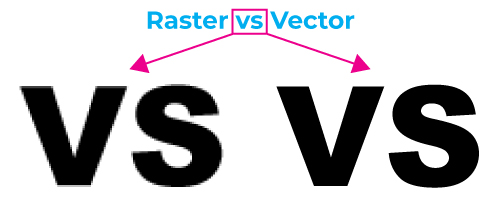
A vector file is a type of digital image file that is created using mathematical equations to represent lines, shapes, and curves. Unlike raster images, which are made up of pixels, vector files are resolution-independent, meaning they can be scaled up or down without losing quality or becoming pixelated.
Vector files are commonly used in graphic design and illustration, as they are ideal for creating logos, icons, and other types of graphics that need to be resized frequently. Some common types of vector files include Adobe Illustrator files (AI), Encapsulated PostScript files (EPS), and Scalable Vector Graphics files (SVG). These file formats can be opened and edited using specialized software such as Adobe Illustrator or Inkscape.
A PDF (Portable Document Format) file can contain both vector and raster elements, depending on how the file was created.
PDF files are primarily designed for document sharing and can contain a range of elements, including text, images, and graphics. If the graphic elements in the PDF were created using vector-based software such as Adobe Illustrator, then those elements will remain vector-based and scalable within the PDF. This means that they can be enlarged or reduced without losing quality.
However, if the graphic elements in the PDF were created using raster-based software such as Adobe Photoshop, then those elements will be raster-based and resolution-dependent. This means that they will lose quality if scaled up beyond their original size.
So, in summary, a PDF file can contain both vector and raster elements, depending on how the file was created and what type of graphic elements it contains.
CMYK stands for Cyan, Magenta, Yellow, and Key (black), which are the four primary colors used in most color printing processes. A CMYK file is a digital image file that uses this color model to represent colors that will be printed using ink on paper or other substrates
CMYK files are used in professional printing, such as offset printing or digital printing, to create high-quality printed materials such as brochures, flyers, and business cards. The colors in a CMYK file are created by mixing various percentages of cyan, magenta, yellow, and black inks.
It is important to note that CMYK colors are not the same as RGB (Red, Green, Blue) colors, which are used for digital displays such as computer monitors and mobile devices. RGB colors can look very different when printed in CMYK, which is why it is important to convert digital images from RGB to CMYK before printing them.
Most professional design software, such as Adobe Photoshop and Illustrator, have options to convert an image from RGB to CMYK mode to ensure that the colors are accurately represented in the final printed product.
An RGB (Red, Green, Blue) file is a digital image file that uses the RGB color model to represent colors on a digital display such as a computer monitor or mobile device.
RGB is an additive color model, meaning that colors are created by adding different amounts of red, green, and blue light together. This means that the more red, green, and blue light that is added together, the brighter and more vibrant the resulting color will be.
RGB files are commonly used for digital media such as websites, social media graphics, and digital advertising. Most digital devices, including computer monitors, televisions, and mobile devices, use the RGB color model to display images.
It is important to note that RGB colors are not the same as CMYK (Cyan, Magenta, Yellow, Key) colors, which are used for printing. When an RGB file is printed, it needs to be converted to CMYK to ensure that the printed colors accurately match the digital colors.
You can send it in JPG, JPEG, PDF, TIF, TIFF, EPS, or PNG formats.
To expedite the turnaround time, we strongly recommend sending PDF files with embedded or outlined fonts with no transparency. It is also essential to flatten your files before uploading. PDFs are easier to handle and manipulate than other formats.
When designing jobs for clear substrates such as clear vinyl or clear acrylic with transparent background, we suggest using vector files such as EPS or PDF formats, with a resolution of 300 DPI or higher. It is best to use black (100% K) for fine lines and text smaller than 9pt. Die lines can be part of the design as long as they are on its own layer name “Cut”.
When sending a print job, it's generally recommended to convert your content from RGB to CMYK color mode. This is because RGB and CMYK represent colors differently, and printing devices use CMYK inks to reproduce colors on paper.
RGB (Red, Green, Blue) is an additive color model primarily used for electronic displays. It has a wider color gamut and can produce vibrant and bright colors that are not achievable in CMYK. However, when you send an RGB file for printing without conversion, the printing device needs to convert it to CMYK. This conversion can result in color shifts, and some bright RGB colors may not be accurately reproduced in CMYK.
On the other hand, CMYK (Cyan, Magenta, Yellow, Black) is a subtractive color model designed for printing. Colors in CMYK are created by subtracting varying amounts of cyan, magenta, yellow, and black inks from white paper. Printing devices, such as printers and presses, typically use CMYK inks.
Converting your content to CMYK before sending it for print allows you to preview how the colors will look in the printed output. It helps you identify any potential color shifts or inconsistencies and make necessary adjustments. By working in the CMYK color space, you can ensure that the printed result closely matches your expectations.
In summary, converting your print job to CMYK ensures that the colors are optimized for printing and minimizes the chances of unexpected color shifts. It allows you to have better control over the final printed output and achieve more accurate color reproduction.
Red, Green Blue (RGB Mode)

Red, Green Blue (CMYK Mode)

Files with low resolution may either be printed as they are or put on hold until we receive new files. In either case, it could delay your turnaround time. For handheld prints your files should be 300 dpi and no less. For large format jobs such as banners, backdrops, tablecoths etc. your file can be 150 dpi.
To ensure a polished and high-quality final product, bleed should extend beyond the cut-line at least .125” and will be trimmed during the final cutting phase. Bleed is necessary when the image needs to extend all the way to the edge.
It's important to keep all text and important objects at least 0.25" inside the cut-line.

For Brochures, Booklets, Calendars, Letter Heads, Business Cards, the recommended bleed is 0.125" all around. For Postcards, Club Flyers, Digital orders, Rack Cards, Sell Sheets, Bookmarks, Door Hangers, Stickers and table tents, we run the jobs at the desire size and then trim an extra 1/16” all around, we do this to save you money and to keep the cost down.
When you choose a size from the dropdown for this product, you're essentially reserving that space on the print sheet. If you opt for a 4x6 size for example, please be aware that the final flyer will be slightly smaller due to the standard 1/16" trimming on all sides. In the event that a different size is sent than what you've selected, please note that the image may be adjusted to fit the chosen space or centered based on your suggested size. Following this adjustment, a minor 1/16" standard trim will be applied as needed.
If you need a true size, we recommend getting a custom quote. If you're using Large format Products, you don’t need to send bleeds, we add bleed for large format automatically.